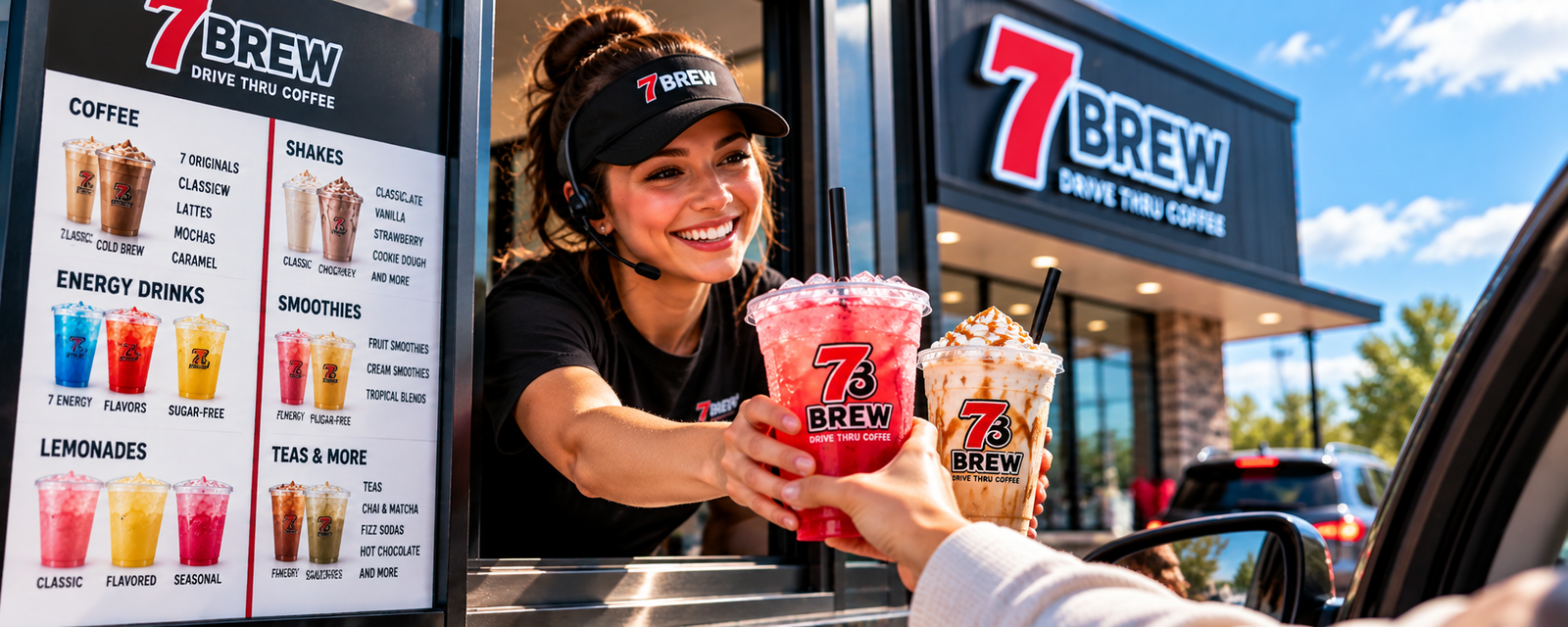
7 Brew Ordering Guide — How to Order Your Drink
7 Brew’s fully customizable menu can feel a little overwhelming the first time you pull up to the window. This guide walks you through the entire ordering process — from reading the menu board to picking the right size — so you can order with confidence every time.
How Ordering at 7 Brew Works
7 Brew is a drive-through coffee and drink chain built around a simple model: you pull up, the window opens, and a friendly team member (often called a drink artist) takes your order on the spot. There are no apps required, no pre-ordering, and no complicated loyalty programs needed just to get your drink. The whole experience is designed to be fast and personable.
What makes 7 Brew different from most drive-throughs is the level of customization available. You’re not just picking from a short list of set recipes — you’re making choices about flavor combinations, cream levels, sweetness, and size. That flexibility is one of the things 7 Brew regulars love most, but it can feel like a lot to navigate the first time.
The basic flow looks like this:
-
Pull up to the window or order board
At most locations, you’ll be greeted by a team member who is ready to take your order. Some locations have a board showing the menu, but the drink artist can also walk you through the options.
-
Tell them what category of drink you want
Coffee, energy drink, lemonade, smoothie, tea — starting with the category helps narrow things down quickly.
-
Choose the specific drink or base
Within each category, there are specific drinks or base options to choose from. Your drink artist can suggest options if you’re unsure.
-
Customize to your taste
This is where 7 Brew really shines. Adjust the sweetness, add a flavor shot, choose a cream level, or swap in a dairy-free milk option.
-
Pick your size
Choose your preferred size from the available options (see the sizes section below or visit Sizes & Prices).
-
Confirm and pay
The drink artist will confirm your order, you pay, and your drink is ready in minutes. That’s it.
What to Look at Before You Order
7 Brew’s full menu covers a wide range of drinks. Before you pull up to the window, it helps to have a sense of what categories are available so you’re not making your first decision while traffic waits behind you.
The main menu categories you’ll encounter at 7 Brew include:
Browsing the full 7 Brew menu before your visit is one of the best ways to arrive prepared. If you’re primarily interested in coffee options, the Coffee section has everything you need. For energy drinks specifically, the Energy Drinks guide covers the 7 Energy line and customization options in detail.
Explore the Full 7 Brew Menu
Browse all drink categories before your next visit.
How to Choose Your Drink
If you’re standing at the board for the first time and feeling overwhelmed, here’s a simple decision path to follow. Run through these steps in order and you’ll land on a drink every time:
Pick your drink category
Coffee, energy drink, lemonade, tea, smoothie, or shake — start with the broad type. Ask yourself: do I want caffeine? Something fruity? Something blended?
Choose the drink or base within that category
For coffee, this might mean a latte, a brew, or a specific 7 Originals or 7 Classics drink. For energy, it’s the 7 Energy base and a flavor. Ask the drink artist if you need a recommendation.
Pick your size
Small, medium, or large. If it’s your first time with a drink, starting smaller is a low-risk way to try it before committing to a larger cup.
Add flavors or customizations
This is optional but where 7 Brew truly shines. Flavor shots, cream levels, sweetness adjustments, dairy-free alternatives — the drink artist can guide you here.
Request sugar-free options if needed
Many drinks and syrups have a sugar-free alternative. Ask which options are available for your chosen drink. See the Sugar-Free Guide for more.
Confirm your order
The drink artist will usually repeat it back. This is your chance to catch anything before the drink is made.
How to Order a 7 Brew Coffee
Coffee is the backbone of 7 Brew’s menu, and it’s worth spending a moment understanding the options before you decide. 7 Brew organizes their coffee drinks into a few main groups:
7 Originals are 7 Brew’s signature coffee creations — their most distinctive drinks that represent the brand. These are the drinks that regular customers often default to and are a great starting point for new visitors who want to experience what makes 7 Brew different.
7 Classics are more familiar coffee formats — your lattes, your macchiatos, your cold brew-style drinks. If you already know what kind of coffee experience you enjoy, the Classics section is a good place to land.
Beyond these two groups, the full coffee lineup includes a range of specialty options. The important thing to remember is that even within these categories, nearly every drink can be customized. You’re never locked into a single version of a drink — the drink artist can adjust the sweetness, add a flavor shot, or modify the cream.
How to Order a 7 Brew Energy Drink
7 Brew’s energy drink line is built around 7 Energy, their proprietary in-house energy drink brand. Unlike chains that simply pour a Red Bull into a cup, 7 Brew uses their own base and builds the drink from there with fruit flavors, creams, and custom combinations.
For a first-time energy drink order, the simplest approach is:
Tell the drink artist you want a 7 Energy drink, then pick a flavor from the board. From there, you can ask about sugar-free options or any cream additions. The drink artist will guide you from there.
Keep in mind that secret-menu energy drinks (community-created combinations with names like “Shark Attack” or similar) are a separate topic entirely. If you want to try one of those, you’ll need to describe the ingredients rather than just the name — more on that in the secret menu ordering section below.
For the complete breakdown of 7 Brew’s energy drink options, sizes, sugar-free choices, and customization paths, see the Energy Drinks guide.
How to Customize Your 7 Brew Drink
Customization is at the heart of what makes 7 Brew different from other drive-through chains. “Any drink, any way” is the core idea — and they genuinely mean it. Nearly every drink on the menu can be modified in multiple ways.
Common customization options across the menu include:
- Choosing a specific flavor shot or syrup
- Adjusting the sweetness level (lighter or heavier)
- Adding a cream, milk, or dairy-free splash
- Requesting sugar-free syrups where available
- Swapping to coconut milk or oat milk
- Specifying ice level (extra ice or light ice)
- Blending the drink for a slush-style version
The exact customization options available for any specific drink depend on that drink’s base and the ingredients currently stocked at your location. Not every location carries every syrup or add-in, and seasonal options can change. The drink artist is your best guide to what’s possible.
For a full rundown of what can be modified across the menu, see the Customizations Guide.
See All 7 Brew Customization Options
Learn exactly what can be adjusted, swapped, or added to any drink.
How to Choose a Size
7 Brew offers drinks in multiple sizes to match different needs. Generally, sizes at 7 Brew range from a smaller option up through medium and large. The exact size names and their ounce volumes can vary by location, so it’s worth confirming at the window if you’re ever uncertain.
As a practical guide:
- Small — A good choice for a first try on a new flavor, or when you want something quick and light.
- Medium — The everyday default for most customers. Enough drink to last a morning commute.
- Large — For long days, when you know you’ll want more, or when you’ve found a drink you already love.
How to Order a Secret Menu Drink
The 7 Brew secret menu is one of the most exciting parts of the 7 Brew culture — it’s a collection of community-created drink recipes that fans have invented, named, and shared with each other. Drinks like the “Blue Shark,” “Sunset Lemonade,” or other named combinations are not official 7 Brew menu items. They exist because customers experimented with customizations and the recipes spread online.
This creates one very important rule for ordering a secret menu drink:
The best approach to secret menu ordering:
- Find the recipe (from this site or a trusted community source)
- Write down or screenshot the ingredient list
- At the window, describe the drink by its ingredients
- Ask if all the required ingredients are currently in stock
Browse the full community recipe collections at the Secret Menu. For coffee-based combinations, see Secret Menu Coffee. For energy drink combinations, see Secret Menu Energy.
How to Order Sugar-Free at 7 Brew
Going sugar-free at 7 Brew is easier than you might think — the menu has solid options whether you’re cutting back on sugar or avoiding it entirely. The key is knowing what to swap and what to keep.
Start by choosing a base drink that’s naturally lower in sugar, such as a cold brew, a sparkling water energy drink, or a tea. From there, ask for sugar-free syrup in place of the standard flavored syrup — most locations carry sugar-free vanilla and sugar-free caramel at minimum. You can also skip the syrup entirely and rely on a flavored base or a cold brew’s natural bitterness to carry the drink.
If you’re ordering a 7Rebel energy drink and want to reduce added sugar, ask for it over ice with no additional sweetener. The energy drink base itself contains some natural sweetener, but skipping the extra syrup brings the total down noticeably.
For a broader look at what fits a sugar-free approach, see the sugar-free secret menu — it’s a curated list of drinks that work well with zero-sugar builds. You can also browse the sugar-free nutrition guide for more context on what each option contains.
Example Orders for Beginners
If you’re not sure how to phrase your order, these examples show the basic pattern — what to decide, and how that translates into something you’d actually say at the window.
| Order Type | What to Decide | Example Approach |
|---|---|---|
| Simple iced coffee | Size + roast strength + milk preference | “Medium iced cold brew with oat milk, no flavor” |
| Flavored latte | Size + espresso + flavor syrup + milk | “Large iced latte, vanilla syrup, 2% milk” |
| Energy drink | Size + energy base + flavor | “Medium 7Rebel with blue raspberry” |
| Sugar-free build | Base + sugar-free syrup swap | “Medium cold brew, sugar-free caramel, almond milk” |
| Secret menu drink | Name from the list + any tweaks | “I’d like to try the [drink name] from the secret menu — can you make that?” |
| First-timer, unsure | Just tell them what you like | “I like sweet coffee drinks — what do you recommend in a medium?” |
What to Say at the Window
First-time customers sometimes freeze up when they pull up to the window and don’t know how to phrase things. Here’s a simple script that works for most orders — customize the bracketed parts for your drink:
Basic Coffee Order
“Can I get a [size] [drink type] with [flavor] and [milk choice]?”
Example: “Can I get a large iced latte with caramel syrup and oat milk?”
Energy Drink Order
“Can I get a [size] 7Rebel with [flavor]?”
Example: “Can I get a medium 7Rebel with peach?”
Secret Menu Order
“I’d like to try the [drink name] — it’s a secret menu drink. Can you make that?”
Example: “I’d like to try the Tropical Punch — it’s a secret menu drink. Can you make that?”
If You’re Unsure
“I usually like [sweet / fruity / strong / light] drinks — what would you recommend?”
The crew at 7 Brew is generally pretty friendly and will help you figure out what you want if you’re stuck. Don’t overthink it — they take hundreds of orders a day and are used to people who aren’t sure yet.
Common Ordering Mistakes to Avoid
A few small things trip up first-timers. Here’s what to watch for so your order comes out exactly the way you want it:
- Not specifying a size — They’ll usually ask, but starting with the size saves a back-and-forth. Small, medium, or large.
- Forgetting to mention your milk preference — If you want oat milk, almond milk, or no milk, say it upfront. The default varies by drink.
- Asking for a drink by an unofficial name without explaining it — Secret menu drinks aren’t on the board. Give the ingredients or describe what it is so the crew can make it correctly.
- Assuming all locations have the same seasonal flavors — Availability can differ by location. If a specific flavor matters, it’s worth asking before you commit.
- Skipping the customization — 7 Brew is built for customization. If you want less sweet, more ice, a different syrup, or a lighter pour, just ask — that’s exactly what they’re there for.
- Ordering at the window for the first time without looking at the menu first — There’s usually a menu board on the way in, but if you want more time, pull up the full menu before you get in line.
Advertisement
Frequently Asked Questions
No. The 7 Brew crew is happy to help you figure out what to order. If you tell them what flavors or drink styles you generally like, they’ll point you toward something that works. You don’t need to arrive with a rehearsed order — just a general idea of what sounds good is enough to start.
Yes — customization is one of 7 Brew’s main draws. You can adjust syrup flavors, milk type, sweetness level, ice amount, and more on most drinks. Some combinations work better than others, but the crew will let you know if something doesn’t quite make sense, and they’ll usually suggest a better version.
Secret menu drinks aren’t listed on the board, so you’ll need to describe what you want. The easiest approach is to name the drink and say it’s from the secret menu — most locations are familiar with popular orders. If the crew isn’t sure how to make it, share the ingredients list from the secret menu guide and they can work from there.
7 Brew offers small, medium, and large sizes. The right size depends on the drink — for stronger coffee drinks, smaller is often plenty; for energy drinks or lighter beverages, medium or large tends to be the popular pick. See the sizes and prices guide for more detail on what each size typically holds.
Yes. Most 7 Brew locations carry sugar-free syrups — vanilla and caramel are the most common — and you can swap them in for any drink that normally uses a sweetened syrup. Energy drink bases can also be ordered without added syrup for a lower-sugar version. The sugar-free secret menu has specific drink builds that work well without added sugar.
7 Brew operates as a drive-thru service, and ordering is done at the window or speaker. Availability of any app or online ordering can change — check with your local 7 Brew or their official website for the most current options. The drive-thru line typically moves quickly, so even without advance ordering the wait is usually short.
If something doesn’t taste right or wasn’t made the way you expected, let the crew know before you leave the window. 7 Brew locations generally want to get your order right and will often fix it or suggest an adjustment on the spot. Policies vary by location, so it’s worth asking at the window rather than assuming nothing can be done.
The best way to find the nearest 7 Brew is to use the store locator on their official website or search “7 Brew near me” in your maps app. The chain is expanding steadily, so if there isn’t one in your area yet, it may be worth checking again in a few months — new locations are opening regularly.
Ready to Explore the Full Menu?
Now that you know how to order, dive into the full 7 Brew universe — coffees, energy drinks, and every secret menu build we’ve found so far.